Bar
The Bar family contains 38 renderer-backed chart variants. Use this page as the entry point for choosing the right variant, then open the variant page for the screenshot, data shape, Rust API notes, and example code.
The chart family is still ordinary Fission UI. Each variant is constructed from typed Rust data, participates in layout and theme decisions, and can be driven by app state, reducers, resources, jobs, or services just like any other widget.
Variants
| Chart | Data shape | Use when |
|---|---|---|
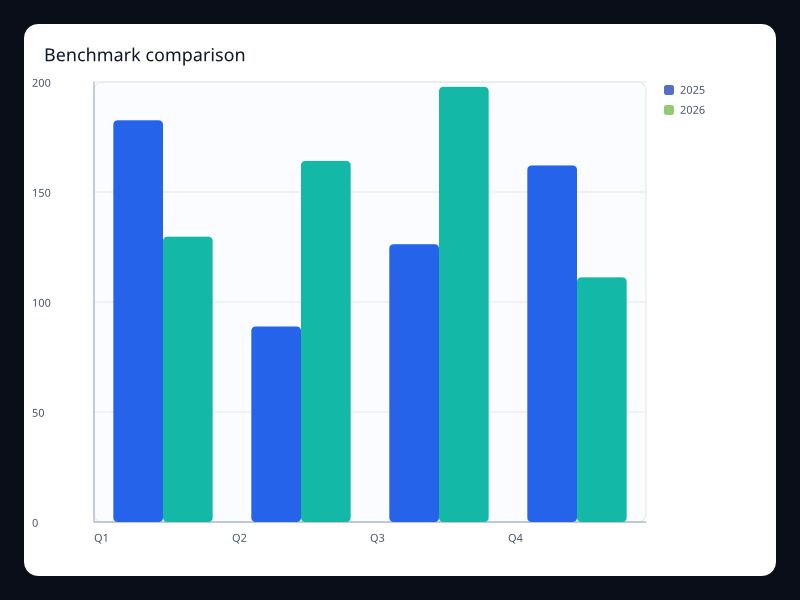
| Benchmark comparison | Actual and benchmark values side by side. | Use it when each category needs a direct benchmark. |
| Budget stack | Stacked BarSeries values. | Use it for departmental totals and breakdowns. |
| Budget variance | Signed budget variances on a horizontal axis. | Use it when over and under budget must be symmetric. |
| Capacity bars | BarSeries plus maximum axis and background. | Use it for quota and inventory screens. |
| Channel stack | Multiple series stacked per category. | Use it when total and contribution both matter. |
| Compact category bars | Vec<f32> aligned to categories. | Use it for short lists and cards. |
| Customer segment bars | Segment values grouped by period. | Use it to compare segments without splitting the page. |
| Diverging bar | Positive and negative BarSeries values. | Use it for sentiment, deltas, and balance views. |
| Funnel unit pictorial bars | Values represented by repeated symbols. | Use it when unit counts should feel more tactile than rectangles. |
| Grouped quarterly bars | Multiple BarSeries on the same categories. | Use it for side-by-side period comparisons. |
| KPI background bars | BarSeries with background styling. | Use it for KPI completion panels. |
| Negative delta bars | BarSeries values crossing zero. | Use it for variance and profit/loss dashboards. |
| Performance bands | Values shown against a visual capacity track. | Use it for scorecards where progress is the dominant signal. |
| Pictorial units | PictorialBarSeries values. | Use it for branded but still quantitative category displays. |
| Priority queue bars | Rounded bars for a compact queue view. | Use it when bars sit inside a polished app surface. |
| Product stack bars | Product values stacked into category totals. | Use it for portfolio composition. |
| Profit and loss bars | Positive and negative values on one value axis. | Use it when gains and losses must share one baseline. |
| Quarter waterfall | Sequential deltas that explain a final value. | Use it for financial bridge and variance analysis. |
| Ranked bar | BarSeries with horizontal orientation. | Use it for rankings with long labels. |
| Region comparison bars | Multiple BarSeries. | Use it for region-by-period comparisons. |
| Region ranking | Category/value pairs sorted for comparison. | Use it when exact rank is the product question. |
| Retail waterfall | Sequential sales and cost changes. | Use it for retail contribution analysis. |
| Return deltas | Category deltas with negative values. | Use it for change analysis around zero. |
| Rounded bar | BarSeries with border radius. | Use it when the chart sits in a polished product dashboard. |
| Sales target track | Values against a fixed target background. | Use it when completion against capacity is more important than raw count. |
| SLA breach delta | Deltas above and below a service baseline. | Use it for operational exception reporting. |
| Small multiple bars A | BarSeries values on a category axis. | Use it in repeated dashboard cards. |
| Small multiple bars B | BarSeries values on a category axis. | Use it when multiple products use the same visual scale. |
| Sorted horizontal bars | BarSeries with category y-axis. | Use it for top-N views. |
| Stacked revenue bars | Multiple BarSeries sharing a stack key. | Use it when totals and composition matter together. |
| Store comparison | Grouped category values across periods. | Use it to compare periods inside each category. |
| Team load bars | Team categories ranked by workload. | Use it when managers need quick capacity comparison. |
| Ticket age distribution | Buckets with counts per age range. | Use it when the reader needs the shape of a queue. |
| Track progress bars | BarSeries with background color. | Use it for completion and capacity comparisons. |
| Utilization capacity | Usage bars with capacity tracks. | Use it for infrastructure and quota dashboards. |
| Waterfall bar | Delta values over ordered categories. | Use it for profit bridges and cumulative change explanations. |
| Weekday shape bars | Seven ordered weekday values. | Use it when the weekly rhythm is easier as bars than a line. |
| Wide-label horizontal bars | BarSeries with category y-axis. | Use it when labels would collide on the x-axis. |
Choosing within this family
Start with the user's question, not the visual effect. Pick the simplest variant that makes the answer clear, add interaction only when it reduces work for the user, and keep animation purposeful enough that it explains a change rather than decorating the page.